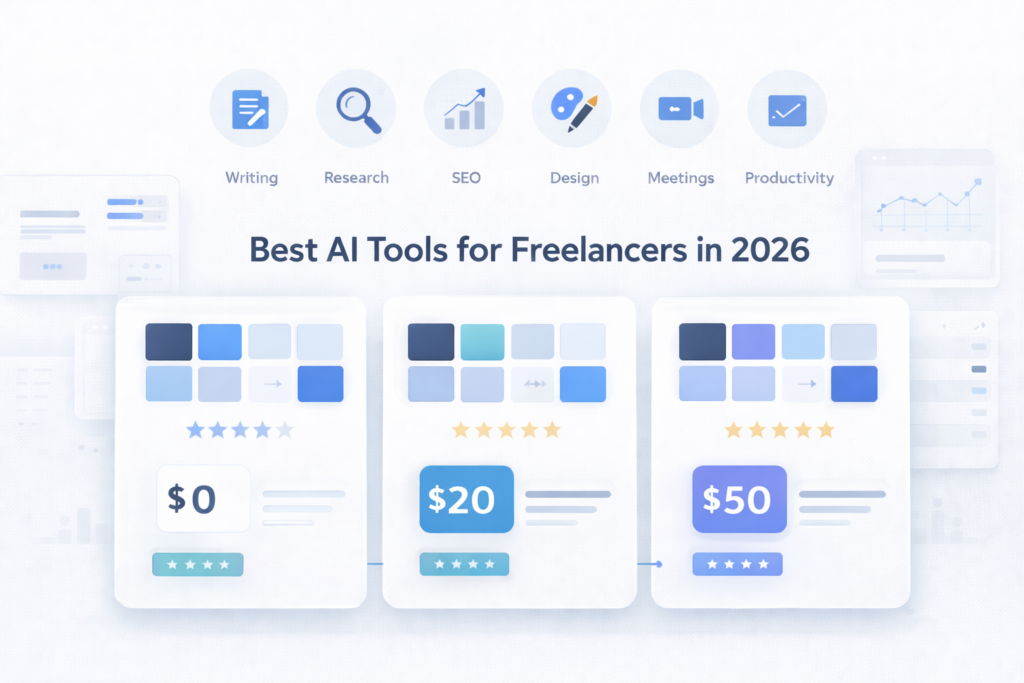
Fiverr reported that 76% of freelancers now use AI tools, and 64% say those tools improve productivity. Upwork also found that 62% of skilled freelancers use AI several times per week.
The hard part is not access anymore. The hard part is choosing the right tools without wasting money on subscriptions you do not need.
This guide cuts through that. I checked current pricing, free plans, and real workflow fit for freelancers on a budget. Some tools are worth paying for. Some are better as free tools. Some are not worth it unless you already have steady clients.
If you want the short version, start with one writing tool, one editing tool, and one research or visual tool. That covers most freelance work without turning your stack into a mess.
On this page
What Do Freelancers Actually Use AI Tools For in 2026?
Freelancers mostly use AI for repetitive work: drafts, research, client emails, admin notes, and simple visual tasks.
The five most common use cases are practical.
First, writing. That includes article outlines, proposals, landing page copy, quick rewrites, and social captions.
Second, research. A research tool can cut the time spent opening ten tabs just to confirm basic facts.
Third, client communication. A follow-up email, scope clarification, or revision boundary message usually does not need twenty minutes of drafting.
Fourth, admin work. Meeting notes, summaries, transcripts, and next-step lists are now easier to automate than almost any other freelance task.
Fifth, visuals. Simple graphics, quick presentations, and social images no longer need a full design session every time.
The time savings are useful, but they are not magic.
A blog post can drop from about 3 hours to 90 minutes when AI handles the outline and first draft.
A client email can drop from 20 minutes to 5 minutes.
A call summary can drop from 30 minutes to almost zero if transcription runs automatically.
A basic featured image can drop from 1 hour to 20 minutes.
The honest caveat matters.
AI does not replace your expertise. It removes the repetitive parts. Strategy, judgment, and client trust still come from you.
→ New to AI tools? Read: How to Start Using AI Tools
Expert Tip
Create one saved prompt for each repeat task. Start with client emails, content outlines, and revision summaries. Reuse works better than improvising every time.
The 10 Best AI Tools for Freelancers in 2026 — My List
You do not need every tool below. You need the few that match your work and budget.
If you are new, start with one core tool, one editing tool, and one research or visual tool. That covers most solo workflows.
Expert Tip
Best Free AI Tools for Freelancers
A zero-budget AI stack is still useful in 2026. You will hit limits, but you can still do real work with it.
ChatGPT Free is still worth using for outlines, short emails, idea generation, and quick rewrites. It falls short once you need long sessions or heavier daily use. Honest verdict: good starting point, but limits show up fast.
Claude Free is one of the better no-cost options for long documents. Honest verdict: a strong free option if you edit longer drafts more than you brainstorm short replies.
Canva Free still covers the basics well. Honest verdict: enough for basic social and blog visuals, not enough for heavier client brand work.
Grammarly Free still handles basic grammar, tone visibility, and quick cleanup. Honest verdict: keep it until you feel the cap.
Perplexity Free is still a strong research tool if your current method is still manual Google plus tab overload.
→ Full Guide: Best Free AI Writing Tools
Expert Tip
Best AI Writing Tools for Freelancers 2026
If your work depends on proposals, emails, blog drafts, or landing pages, writing quality matters more than feature count.
ChatGPT Plus costs $20 a month. Its strength is range. It handles proposals, client emails, outlines, rewrites, and quick research in one place. Its weakness is tone drift on technical topics. If the prompt is vague, the output gets generic fast. Best for: freelancers who write client-facing content every day. Skip if: you mainly want a coding-first assistant. Free alternative: ChatGPT Free.
The current subscription price is listed on the official ChatGPT pricing page.
Claude Pro also costs $20 a month. Its strength is long-form flow. It is usually calmer and cleaner on article-length drafts and document editing. Its weakness is speed on small tasks. For a short reply or three-line email, it can feel slower than needed. Best for: bloggers, ghostwriters, and long-form content freelancers. Skip if: you mainly need quick short outputs. Free alternative: Claude Free.
You can see the current subscription plans on the official Claude pricing page.
Writesonic is best when draft speed matters more than voice. Its strength is speed. Its weakness is product sprawl and extra cleanup. Best for: high-volume content freelancers who also care about SEO workflows. Skip if: you want a cleaner writing-only tool. Free alternative: ChatGPT Free or Claude Free.
Use ChatGPT when you need one tool for many tasks. Use Claude when long drafts matter most. Use Writesonic only if speed matters more than cleanup.
→ Full Comparison: ChatGPT vs Claude vs Gemini 2026
Expert Tip
Do not ask one tool to do every writing job. Draft in one place. Edit in another. That usually gives cleaner output.
Best AI SEO Tools for Freelancers 2026
SEO freelancers need fewer paid tools than they think.
Surfer SEO is useful because it gives a clear content workflow and optimization targets. Its weakness is cost. Best for: SEO freelancers with recurring clients and content production volume. Skip if: you are still learning research basics.
Rank Math remains one of the stronger free WordPress SEO tools. Its strength is obvious: schema support and on-page help without paying on day one. Its weakness is platform lock. It only helps if the site runs on WordPress. Best for: WordPress bloggers and freelancers managing WordPress client sites. Skip if: your client stack is not WordPress.
Ubersuggest is useful for beginner keyword checks and light competitor research. Its strength is accessibility. Its weakness is depth. Serious research will outgrow it. Best for: freelancers validating early content ideas on a budget. Skip if: you need deep daily keyword and competitor work.
If you are just starting, paid SEO AI tools are usually not your first buy. A better path is free plugin plus manual SERP analysis first.
→ Full Guide: Best Free SEO Tools for Bloggers 2026
Quick comparison of the most useful AI tools freelancers use in 2026.
| Tool | Best For | Price | Free Plan | Rating | Skip If |
|---|---|---|---|---|---|
| ChatGPT Plus | General writing | $20 | Yes | 4.5/5 | You mainly write code |
| Claude Pro | Long-form writing | $20 | Yes | 4.5/5 | You need quick answers |
| Perplexity Pro | Research | $20 | Yes | 4/5 | You need content writing |
| Grammarly Pro | Proofreading | $12 | Yes | 4/5 | You want rewriting |
| Canva | Visuals | $15-20 | Yes | 4/5 | You use Photoshop |
| Otter | Meeting notes | $8 | Yes | 4/5 | You rarely join calls |
| Fireflies | Call transcription | $10 | Yes | 4/5 | You avoid meeting bots |
| QuillBot | Rewriting | $8 | Yes | 4/5 | You rely too much on paraphrasing |
| Writesonic | Fast drafts | $20 | Yes | 3/5 | You need minimal editing |
| Surfer SEO | SEO optimization | $99 | No | 3.5/5 | You are a beginner |
Expert Tip
Do not buy a premium SEO tool before you have a repeat SEO workflow. Free tools plus disciplined manual checking still beat expensive software you barely open.
Best AI Tools for Non-Native English Writers
If English is not your first language, the right tool cuts editing time. The wrong one creates more cleanup.
Grammarly Pro is strong at catching the friction points that slow non-native English writers down: article use, punctuation, tone mismatch, and formal email phrasing. Its weakness is sentence architecture. It fixes mistakes better than it rebuilds awkward structure. Best for: freelancers writing client emails, proposals, and polished blog content in English. Skip if: your issue is idea generation more than editing. Free alternative: Grammarly Free.
Grammarly lists its subscription tiers on the Grammarly pricing page.
QuillBot Premium is useful for rephrasing awkward lines into more natural English. Its weakness is sameness. Overuse makes writing sound bland and detached from your real voice. Best for: freelancers who know what they want to say but want smoother English. Skip if: you already write natural English and only need grammar cleanup. Free alternative: QuillBot Free.
ChatGPT editing mode is often the best free option for tone. A prompt like “Edit this for natural English. Keep my meaning. Keep it professional and short” works well for emails and proposals. Its weakness is inconsistency when prompts are vague. Best for: formal client communication and quick line-by-line cleanup. Skip if: you want one-click proofreading with no prompting. Free alternative: ChatGPT Free.
A practical combo works better than one perfect tool. Draft in your own words. Run grammar in Grammarly. Then ask ChatGPT to smooth tone without changing meaning.
→ Full Guide: AI Tools for Non-Native English Writers
Expert Tip
Use this prompt: Edit this for natural English. Keep my meaning. Keep it professional. Make the sentences shorter. Do not make it sound like marketing.
How to Build Your AI Stack on a Budget
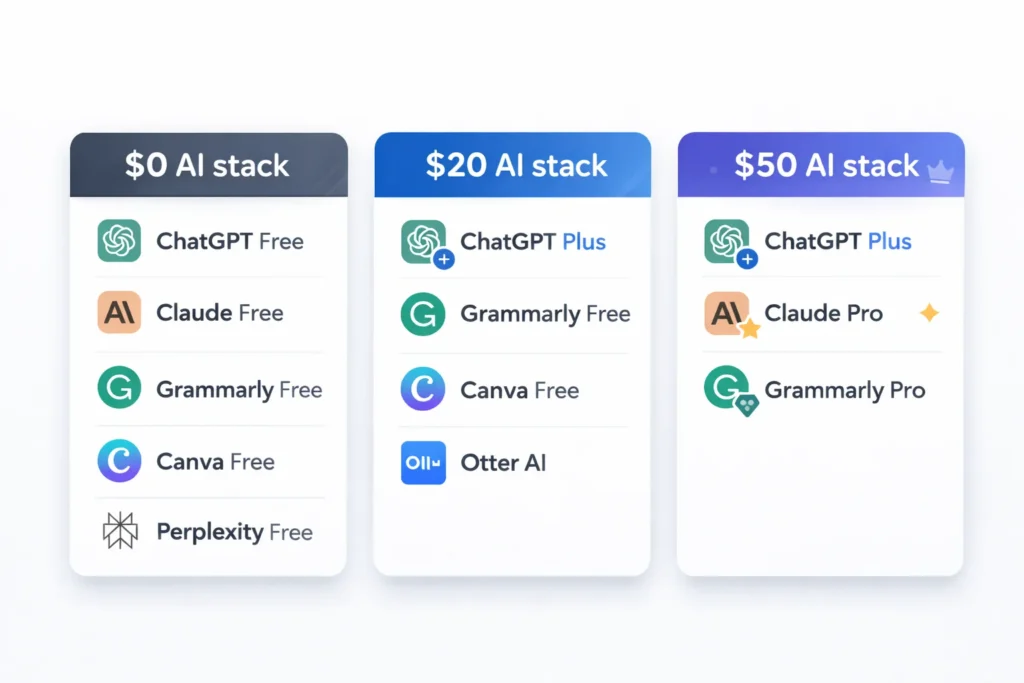
$0 Stack
ChatGPT Free for writing
Claude Free for long drafts
Grammarly Free for grammar
Canva Free for visuals
Perplexity Free for research
Monthly cost: $0
Covers: about 70% of common freelance tasks
Main limit: daily or session-based usage caps
$20 Stack
ChatGPT Plus for core AI work
Grammarly Free for grammar
Canva Free for visuals
Otter Basic for meetings
Monthly cost: $20
Covers: about 85% of common freelance tasks
Best for: writers, bloggers, and content creators
$50 Stack
ChatGPT Plus at $20
Claude Pro at $20
Grammarly Pro at $12
Monthly cost: $52
Covers: about 95% of common freelance tasks
Best for: full-time freelancers writing and editing every day
Start with the $0 stack for 30 days. Upgrade only after you hit limits often enough that they slow down paid work.
5 Mistakes Freelancers Make With AI Tools
The biggest AI mistake is not using it. The second biggest is using it badly.
Mistake 1: Using too many tools
Fix: Pick three maximum and learn them well first.
Mistake 2: Publishing AI output without editing
Fix: Treat AI as first draft support only. Add your own examples, judgment, and fact checks.
Mistake 3: Expecting AI to replace client relationships
Fix: Use AI for tasks. Keep sensitive communication human.
Mistake 4: Paying before testing
Fix: Most major tools still offer a free plan, a free trial, or a limited free tier. Test before paying.
Mistake 5: Using generic prompts
Fix: Ask for a specific result, format, and tone.
Bad prompt: Write me an email.
Better prompt: Write a 3-line email declining revision round 4 politely. Keep the tone calm. Offer paid extra revisions.
Quick Check
- Do you use more than 5 AI tools
- Do you publish AI output without editing
- Have you tested free plans before paying
If yes to 1 or 2, fix that first. Most freelancers do not have a tool problem. They have a workflow problem.
Expert Tip
My Real AI Workflow as a Freelancer
A working AI workflow is boring on purpose. It follows the job from research to outline to draft to edit to delivery.
Morning: Research and Planning
Use Perplexity for source gathering. Then use ChatGPT to turn rough notes into an outline.
Time saved: about 45 minutes to 15 minutes.
Core Writing
Claude Pro works well for long-form drafting. Grammarly Pro catches the obvious language friction in the final pass.
Time saved: about 3 hours to 90 minutes.
Client Communication
ChatGPT works well for first-pass email drafts. Grammarly helps catch tone issues before send.
Time saved: about 20 minutes to 5 minutes.
Design and Visuals
Canva handles quick thumbnails, simple social graphics, and blog visuals.
Time saved: about 1 hour to 20 minutes.
A writing-heavy freelancer can realistically save 8 to 10 hours per week on repetitive work with a setup like this. These savings are strongest on repetitive work. Strategy, creative judgment, and final decision-making still take human time.

Expert Tip
Track one week of work before adding tools. Track one week again after 30 days. Your own time log matters more than marketing claims.
FAQ
ChatGPT Plus is still the safest single-tool choice for most freelancers because it covers writing, brainstorming, research, and client communication in one place for $20 a month. Claude Pro is stronger for long-form writing. If your budget is zero, start with ChatGPT Free and test the limits first.
Yes. ChatGPT Free, Claude Free, Canva Free, Grammarly Free, and Perplexity Free still cover a large share of common freelance tasks. The tradeoff is usage limits, fewer premium features, and slower daily throughput. For part-time freelance work, that can still be enough.
Conclusion
Three points matter most.
Start with the $0 stack and test it for 30 days.
Use 2 or 3 tools well, not 10 badly.
AI saves the most time on repetitive tasks, while your expertise still wins clients.
Your next move is simple. Pick one tool from this guide. Use it on real work for 30 days. Measure the time saved. Then decide if the paid plan earns its place.